
VM Templates
The proxmox-vm-templates repository is used to create virtual machine templates. The code is written in Ansible. The playbook that creates the templates is located in the file: deploy-vm-templates.yaml. Templates are deployed on all servers that are part of the Proxmox cluster and are saved to the disk space: local-lvm.
The source for system images are publicly available cloud-init images of popular Linux distributions.
- Ubuntu: https://cloud-images.ubuntu.com/
- Debian: https://cloud.debian.org/images/cloud/
- Rocky Linux: https://rockylinux.org/alternative-images
Cloning the repository.
git clone git@gitlab.example.com:homelab/proxmox-vm-templates.gitPrerequisites
For Ansible to create templates, you need to generate and add an SSH key for Ansible on each server.
vault
The generated keys need to be added to the KV store in the local HashiCorp Vault. The SSH keys for Ansible are stored at the path kv/ssh_keys/ansible
Generating an SSH key
The ssh-keygen command is used to generate an SSH key.
bash ~$ ssh-keygen
Generating public/private rsa key pair.
Enter file in which to save the key (/root/.ssh/id_rsa): /root/.ssh/ansible
Enter passphrase (empty for no passphrase):
Enter same passphrase again:
Your identification has been saved in /root/.ssh/ansible
Your public key has been saved in /root/.ssh/ansible.pub
The key fingerprint is:
SHA256:cqIvLsgVt7uvMxmUiKwhzdMLRE98q1vWVHhTDtyOrdc root@node1
The key's randomart image is:
+---[RSA 3072]----+
| ....    o.o.    |
|  .o. . . =o.    |
|.+..o... o =.    |
|oo=o.+. . . o    |
|o. o+o+oS  . .   |
|.  .o+o+. . . E  |
|... .++    .     |
|... o*           |
|   o.+B.         |
+----[SHA256]-----+
bash ~$
The command will produce two files.
$ ls -l ~/.ssh/ansible*
-rw-------    1 root     root          2590 Mar 17 18:05 /root/.ssh/ansible
-rw-r--r--    1 root     root           564 Mar 17 18:05 /root/.ssh/ansible.pub
Installing the key on the Proxmox server
Log in via SSH to the Proxmox servers as root and add the contents of the ansible.pub file (generated in the previous step) to the ~/.ssh/authorized_keys file. This step is necessary for the playbook to execute correctly.
Configuration Files
Two cloud-init type files have been added to the repository. They have been divided by Linux distribution:
- userdata-debian.yaml
- userdata-ubuntu.yaml
Their main purpose is to install the qemu-guest-agent program required by Proxmox and to set up an administrative account on the virtual machines. Thanks to SSH keys, automation (Ansible) and all homelab administrators have access to the account.
#cloud-config
runcmd:
  - apt -y update
  - apt install -y qemu-guest-agent
  - systemctl enable qemu-guest-agent
  - systemctl start qemu-guest-agent
timezone: Europe/Warsaw
system_info:
  default_user:
    name: "default-user"
    lock_passwd: false
    sudo: ALL=(ALL) NOPASSWD:ALL
    ssh_authorized_keys:
      - ssh-rsa AAAAB3Nzaxxxxxxxx
      - ssh-rsa AAAAB3Nzaxxxxxxxx
      - ssh-rsa AAAAB3Nzaxxxxxxxx
ssh_pwauth: yes
package_upgrade: true
package_reboot_if_required: true
ssh
In addition to administrators' keys, you also need to add the ansible.pub public key to this file. Ansible will perform additional configuration tasks on the created VMs.
In the group_vars/proxmox_hosts file, we define which templates should be generated.
templates_config:
  cores: 1
  vcpus: 1
  memory: 1024
  bridge: "vmbr0"
vm_templates:
  ubuntu-2404-basic-amd64:
    url: "https://cloud-images.ubuntu.com/noble/current/noble-server-cloudimg-amd64.img"
    vmid: 2000
  debian-13-amd64:
    url: "https://cloud.debian.org/images/cloud/trixie/latest/debian-13-genericcloud-amd64.raw"
    vmid: 3000
Manual Execution
To generate templates manually, we need a properly prepared environment on the computer, which consists of installed Ansible, a generated SSH key needed for deployment on Proxmox, and set environment variables.
Vault
If the SSH keys for Ansible are saved in the local vault, we can download them and save them to an account on a local or remote machine where we will run the playbook.
Installing Ansible
Installing Ansible using Ubuntu as an example.
sudo apt-add-repository ppa:ansible/ansible
sudo apt update
sudo apt install ansible
Environment Variables
Before running the playbook, three environment variables must be set:
- PROXMOX_API_USER
- PROXMOX_API_PASS
- PROXMOX_API_HOST
- ANSIBLE_SSH_KEY_PUB
The easiest way to set them is to create a .env file with the following content.
export PROXMOX_API_USER="login@pam"
export PROXMOX_API_PASS="Password"
export PROXMOX_API_HOST="1.2.3.4"
export ANSIBLE_SSH_KEY_PUB="ssh-rsa AAAAB3Nzaxxxxxxxx"
We can also load these variables directly from HashiCorp Vault.
Important
This method requires installing the vault client.
# Proxmox API Configuration for Ansible
export PROXMOX_API_HOST=$(vault kv get -field=PROXMOX_API_HOST kv/platforms/proxmox)
export PROXMOX_API_USER=$(vault kv get -field=PROXMOX_API_USER kv/platforms/proxmox)
export PROXMOX_API_PASS=$(vault kv get -field=PROXMOX_API_PASS kv/platforms/proxmox)
export ANSIBLE_SSH_KEY_PUB=$(vault kv get -field=ANSIBLE_SSH_KEY_PUB kv/ssh_keys/ansible)
Loading variables into the shell.
source .envRunning the Playbook
After loading the environment variables and configuring the key path, you can run template creation.
ansible-playbook -i hosts deploy-vm-templates.yamlCI/CD Pipeline
The repository has a pipeline configured to deploy templates to Proxmox servers. For it to execute correctly, we need a GitLab Runner running that is connected to the GitLab instance.
Environment Variables
The pipeline is integrated with Vault. The appropriate environment variables are required for proper execution.
Environment Variables
Variables must be set at the Homelab group level, not at the individual repository level.
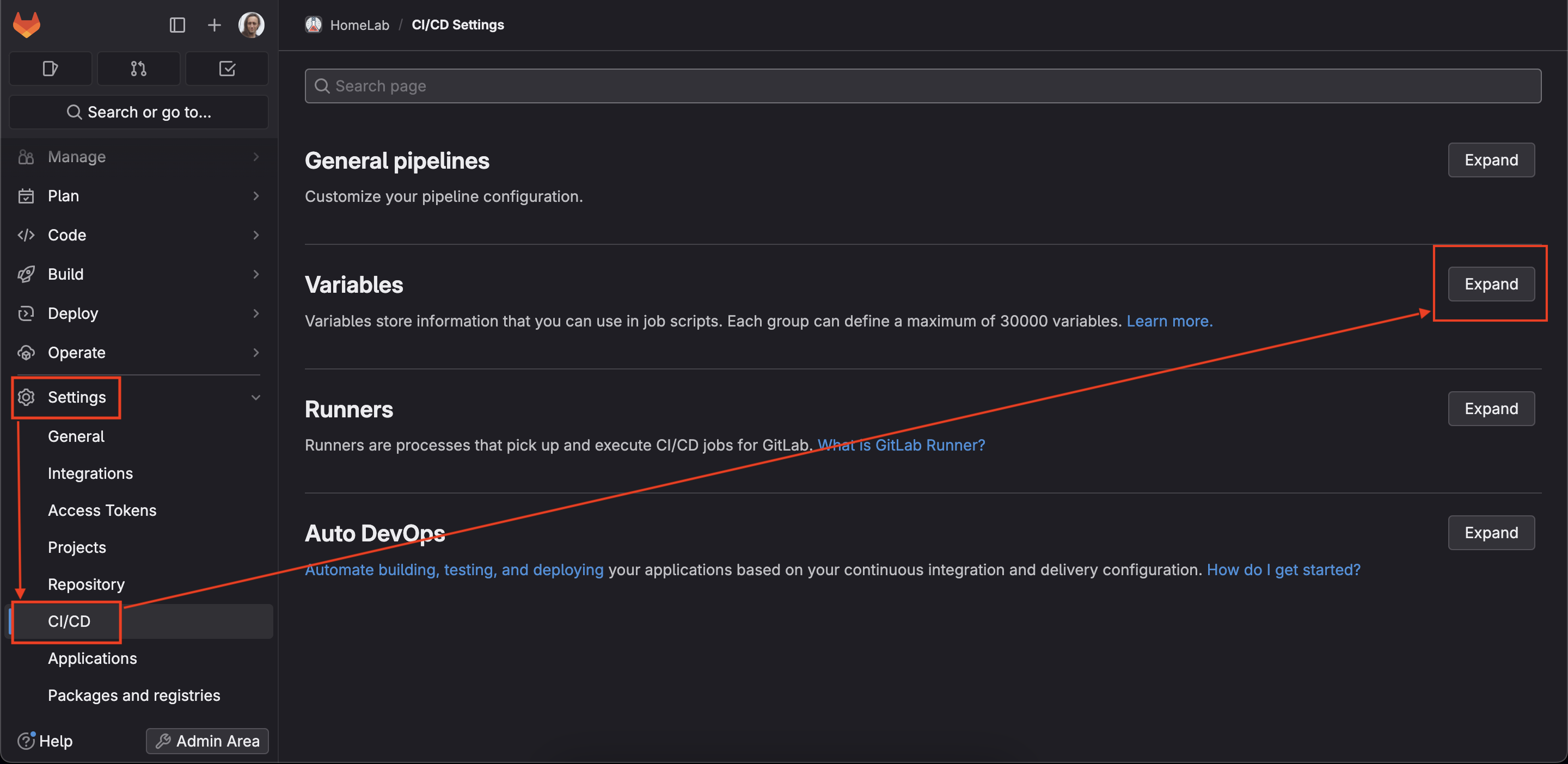
| Key | Type | Environments | Value |
|---|---|---|---|
| VAULT_ADDR | Variable | All | Address of the local Vault instance |
| VAULT_AUTH_ROLE | Variable | All | The role in Vault that has permissions to read secrets |
Deploying Changes
It is recommended to make changes using branches. This allows code review to prevent potential errors.
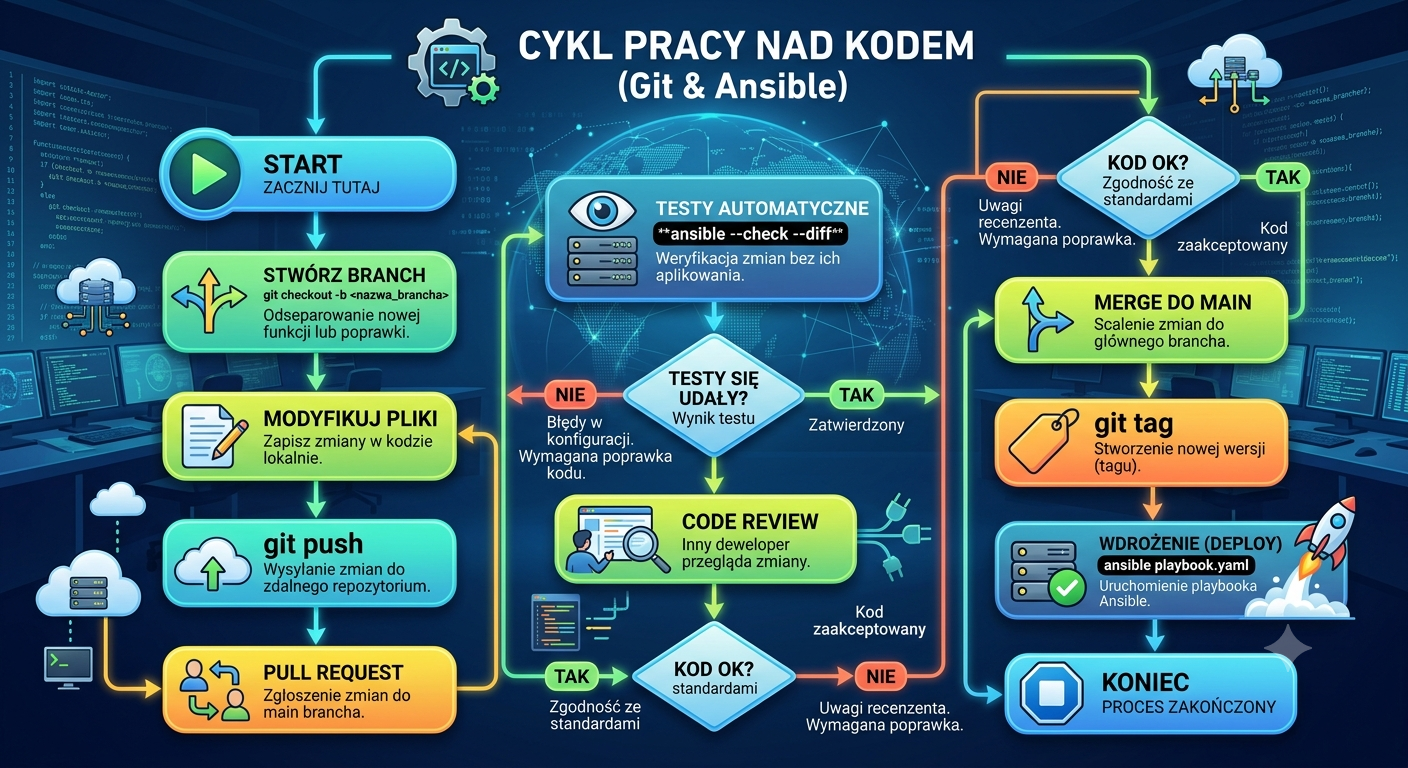
Pipeline
The pipeline reacts to two events:
- merge request
- setting a tag
- manual action
Execution Stages:
| Stage | Conditions | Description |
|---|---|---|
| initialize | merge request merge to main tag set | Preparing the environment for Ansible execution: installing SSH key, preparing artifacts |
| check | merge request merge to main tag set | Configuration check: ansible-playbook -i hosts deploy-vm-templates.yaml --diff --check |
| build | merge (push) to main and manual action execution | Deployment execution: ansible-playbook -i hosts deploy-vm-templates.yaml |